Project
Granspace
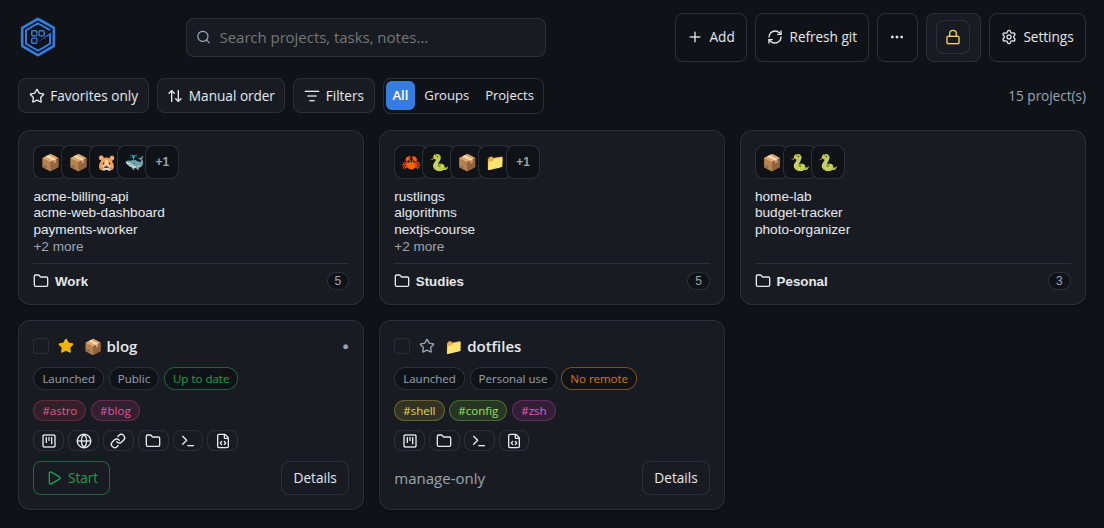
A local dashboard for managing every dev project scattered across your machine — discover and organize them with a Kanban board, run them with live logs, and track git health. Ships as a web dashboard, a native Electron desktop app, and via MCP tools so AI agents can drive it too.
Description
Granspace is a local-first control center for every project scattered across a dev machine. It discovers projects across configured root folders, then lets you organize them with tags, a configurable Kanban board, and pinned notes, run their npm scripts with live colored logs, watch git sync status, and manage per-project environment variables with secrets encrypted behind a master password. Everything works from a web dashboard, a native Electron desktop app, or through MCP tools, so an AI coding agent can query and drive it directly.
Technologies
Frontend is React + TypeScript on Vite. The backend is a small Express server backed by SQLite (better-sqlite3) for the project registry. The desktop build wraps both in Electron, and an MCP server (@modelcontextprotocol/sdk) exposes the same project data and actions as tools for AI agents like Claude Code.
Repository
Private repository — the project site above has downloads, docs, and screenshots.
Live Demo
There’s no browser-based demo, since Granspace is a desktop app that manages files and processes on your own machine. The link above is the project site, with downloads, docs, and screenshots.
Main Challenges
Packaging the same Electron app correctly across Linux, Windows, and macOS surfaced several platform-specific bugs late in the release cycle:
- On macOS, the app icon rendered as colored noise in Finder and Spotlight (but looked fine in the Dock).
- “Launch on login” silently didn’t work on Linux, and looked like it kept resetting itself on macOS.
Solutions Implemented
- The macOS icon bug traced back to
electron-builderderiving the.icnsfrom a PNG and sizing the Retina slots at double their declared dimensions — read as garbage by the size-trusting Finder/Spotlight paths, but decoded correctly by the Dock. Fixed by building the.icnswith Apple’s owniconutilinstead, plus a regression test that rejects any size-mismatched slot. - Electron’s
setLoginItemSettingsAPI has no Linux implementation at all (a silent no-op), so Linux now gets a real XDG autostart.desktopentry (AppImage-aware). On macOS 13+, a freshly registered login item needs a one-time manual approval in System Settings, during which the OS reports it back as off — so the app now persists the user’s intended toggle state as the source of truth and re-asserts it on every launch, with a hint and direct link to System Settings when approval is still pending.